
Official Shitty Level Standards
If you would like your shitty level to have a greater chance at getting added, these are some tips and guidelines. We strongly recommend you read all of these before you start creating your level. If your level doesn't follow the standards, we may not add your level.
Recommendations for Acceptance
Here are some things that will further increase the chances that feedbackers will accept your level:
- Grid Blocks: Use grid blocks wherever possible, and try to avoid using black blocks for structures.
- Neatness: Ensure that the level looks neat and presentable.
- Feedback: Get opinions from fellow shitty creators (especially those who are also feedbackers) to improve the level.
- Performance & LDM: If your shitty level causes lag, make an LDM that gets rid of the lag.
- Air & Background Deco: For TSL+ in particular, having background/air deco is necessary, though it is not necessary for them to be overly complicated.
- Decoration Bugs: Decoration bugs such as grid shading, layering issues, and incomplete structures need to be fixed or the level will be rejected. (TSL will be a bit more lenient on certain things while TSL+ will be strict on everything).
Gameplay Standards (Common)
| # | Standard | Description |
|---|---|---|
| 1 | Enjoyment is Key | If you are going to make a level, depending on difficulty, please make sure to focus on more than just the difficulty and to make a genuine effort to make it as fun and balanced as possible. |
| 2 | 2-Player Levels | Shitties of 2-player levels are allowed, provided that completions are done solo, with a handcam. Completions involving multiple players are not allowed, and a handcam is required to prove that. |
| 3 | No Challenges | A shitty version of a challenge is not allowed. The level must be longer than 30 seconds. Levels that are right on the boundary (e.g., Cobwebs) will be reviewed on a case-by-case basis to determine if they are allowed to be placed on the list. Levels that are rated can have an exemption from this rule. |
| 4 | No Repeated or Combined Levels | Shitty versions of repeated/combined existing levels are not allowed. Levels made from mashing two or more levels are allowed only if: • There is no repetition of levels. • The mashed version of the OG level(s) involved is verified legitimately. If an existing shitty is used as part of the level, the host of that shitty must approve the use of their level. |
| 5 | Shittified Levels must have a public version. | Levels must be a shitty version of an existing level that is available publicly on the GD servers. Making a shitty version of your own private layout is not allowed; you must upload that layout to the GD servers as a public level. Likewise, if you make a completely original shitty level, there needs to be an accompanying OG level that reliables can compare it against. Exceptions are granted to original shitty levels not based on existing levels, provided that they meet at least a featured rating standard. |
Gameplay Standards (TSL+)
| # | Standard | Description |
|---|---|---|
| 1 | Difficulty Cap | A shitty level cannot be harder than the current 150th hardest demon on the All Rated Extreme Demons List (AREDL). |
| 2 | Significant Nerfs | A shitty level must be nerfed significantly. The nerfs in the level should be noticeable, and not be pixel nerfs. Unnerfed sections are allowed, as long as everyone considers them as relatively easy. Playtesters are recommended for your level. The harder the level, the more important it is to get playtesters for your level. |
| 3 | No Gameplay Changes | Gameplay changes are not allowed. Whenever possible, try to nerf the level without changing the base gameplay of the level. Exceptions to this rule include: • Cases where it is near impossible to nerf the section in such a way that is reasonably doable, which is particularly an issue for shitty versions of levels on the Impossible Levels List. • When the original level has not been beaten by anyone. • When dealing with high CPS consistency clicking parts, provided the changed gameplay is done with the aim of reducing the CPS needed while the gameplay type remains the same. |
| 4 | No Duplicate or Similar Shitties | Shitty levels of similar original levels are forbidden on the list site. If a shitty of a certain level is on the list, other shitties of the same level will not be added, even if the other shitties may play and look better. If you get permission from the original creator (with proof) or the level falls off the legacy list from the site, it may be able to be remade. We also will not allow different levels that are nearly identical or exactly the same in terms of gameplay (e.g., Sonic Wave & Auditory Breaker, Erebus & ErebuS, etc.). There are exceptions to having old and new versions of the same level on the list if the gameplays are significantly different from each other. |
Gameplay Standards (TSL)
| # | Standard | Description |
|---|---|---|
| 1 | Difficulty Ceiling | A shitty level must be below GDDL Tier 24.5. Any level deemed to be GDDL Tier 24.5 or higher will be considered too hard for TSL, and any level deemed GDDL Tier 24.49 or lower will be eligible for TSL. |
| 2 | Difficulty Floor | A shitty level must be as hard as a tier 2 easy demon on GDDL. Levels on the list must be comparable to a level with at least a 1.5 difficulty rating on the GDDL (which corresponds to a tier 3 placement). Levels below that difficulty are considered too easy for the list. |
| 3 | No Buffs | No part in the level must be buffed from the original level. The level cannot contain any parts that can be considered buffed. Levels that are hard demon or below can be fully unnerfed, while anything harder needs to have nerfs, even if very slight (pixel nerfs don't count). |
| 4 | Enjoyment Priority | Gameplay changes cannot make the level less enjoyable. Gameplay changes are allowed in a manner that increases the level's overall enjoyment. To reduce bias, opinions from people who have not beaten the original level will have a greater consideration over those who have. |
Decoration Standards
Unlike past standards, which focus on specific object-based compliances, this new set of standards focus on visuals-based compliances. This means that, as long as the level looks shitty, the objects used to achieve that look will not be factored in.
Colors & Triggers
| Colour Channel | Restrictions |
|---|---|
| Background (BG) | • Any shade of blue is allowed (Feedbackers will determine if it looks blue enough). • Default background image (Update 1.0) is strongly recommended (if an alternate BG image makes the level look bad, the level can be rejected over it). • Pulse and colour triggers can be used to change between allowed colours. • BG colour can be changed to black only in transition screens. |
| Middleground (MG) | • Any shade of blue is allowed (Feedbackers will determine if it looks blue enough). • Preferably disabled by default (if the MG image makes the level look bad, the level can be rejected over it). |
| Ground (GND) | • Blue or black coloured. • Default background image (Update 1.0) is strongly recommended (if an alternate GND image makes the level look bad, the level can be rejected over it). |
| Ground, Object, 3D-lines (L, OBJ, 3DL) | • Must be white coloured (L can be made invisible alongside GND if it looks better). • 3DL can be black with less opacity, but this should not be used frequently. |
| Colour Groups (COL) | • Use as necessary. |
Additional Notes
- HSV: HSV can be set to anything, provided that the specific values used don't break other visual standards.
- Color & Pulse Toggles: If you wish to put different colours / pulses in your level, there needs to be a trigger / trigger orb / collectible at the beginning of the level that toggles them on, and is able to be activated easily (i.e., should not be able to kill the player).
DFDE and No Glow
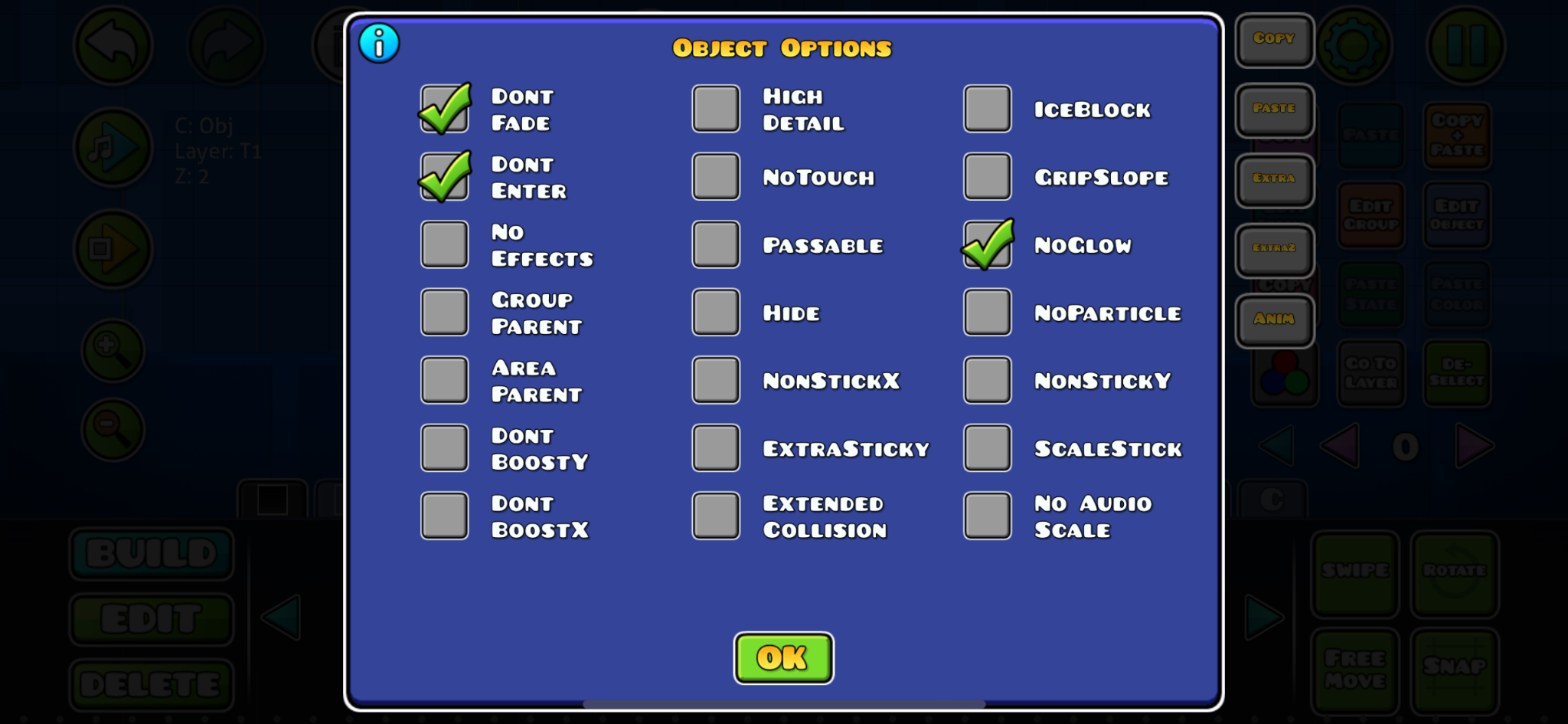
You have to enable no glow, don't fade, and don't enter for all objects by pressing the Edit Group button (Image 1), then selecting the button that says "Extra" to open the extra object options (Image 2).
You can disable don't fade and don't enter if you plan on doing anything with the fade and enter effects (like those found in Shardscapes and Nullscapes).
Levels will not be rejected if these options are not enabled for some objects, but if a decent chunk of the level doesn't have these options disabled, your level can get rejected.
| Step 1: Edit Group | Step 2: Extra Options (DFDE & No Glow) |
|---|---|
 |  |
Allowed Objects & Aesthetic Guidelines
There will not be an exhaustive list of allowed objects anymore, so you are free to use any objects in the editor, except:
| Prohibited Color Modification Buttons |
|---|
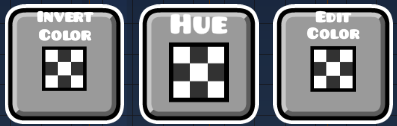 |
| Invert Color, Hue, and Edit Color buttons are not allowed. |
However, your level will instead be judged based on aesthetic guidelines:
- Grid Blocks: A majority of your level must be made with grid blocks.
- Black Blocks: Black-coloured blocks can be used to fill groundspikes, but apart from that, should not be used as often as grid blocks.
- Patterned & Brick Blocks: Triangle-pattern and old-brick-themed blocks may also be used sparingly, such that in any frame of the level, they do not feature more prominently than grid blocks.
- Allowed Palette: For almost any non-standard block that you use, they must be black, white, or BG-coloured. Other colours are not allowed, except for collectibles and icons.
- Outlines: Solid blocks are strongly recommended to have white outlines, although occasional exceptions may be granted based on the level itself, such as briefly changing to black.
- Decoration Bugs: You must ensure that your level is as free of decoration bugs as possible (e.g., layering issues, incomplete ground/ceiling). If these issues are not very glaring and not very common throughout the level, your level can still be accepted, though you will be recommended to fix them.
- Exemptions: Level endscreens, art within the level, recreations of in-game assets, text made with custom fonts, and fully invisible objects are exempt from the above standards (i.e., they can use objects that are not allowed, and be of any colour).
- Shader Triggers: Any allowed shader trigger must be unmodified from the original level, except to make the shader effect less intense.
- Color Changing Triggers: Any allowed trigger that changes the colours of any object or background may only switch between allowed colours.
- Shake Triggers: Shake triggers from the original level can be retained or removed, but no new ones can be added. Players who don't want to play with shake triggers may disable them in their in-game options. Levels must also not force players to enable shake effects (e.g., The Art of the Blade).
- Start Positions: Start positions are allowed to be used in levels, as long as they are disabled before publishing the level. In fact, you are recommended to include these disabled start positions in your level to allow players to practice specific parts of the level without making their own copies.
Broad Rejection Principles Even if your level follows the above guidelines, feedbackers may still reject your level based on the following broad principles:
- Something in the level doesn't have a "shitty" aesthetic.
- Something in the level looks "ugly".
- The level looks way too much like a layout.
BG-Coloured Blocks Explainer
White-coloured objects can also be recoloured to be background-coloured. These BG-coloured objects may only be used for masking purposes (such as background layering, where objects underneath get hidden). Other creative uses of BG-coloured objects are only on a case-by-case approval basis.
BG-coloured glow may also be allowed to enhance the decoration of the level, but its use will be very strictly controlled.
You can use BG-coloured objects of varying brightness. To do this, a colour channel needs to be configured as shown below (brightness has to be set to a value between 0.50 and 0.80):
| Layering Color Channel Configuration |
|---|
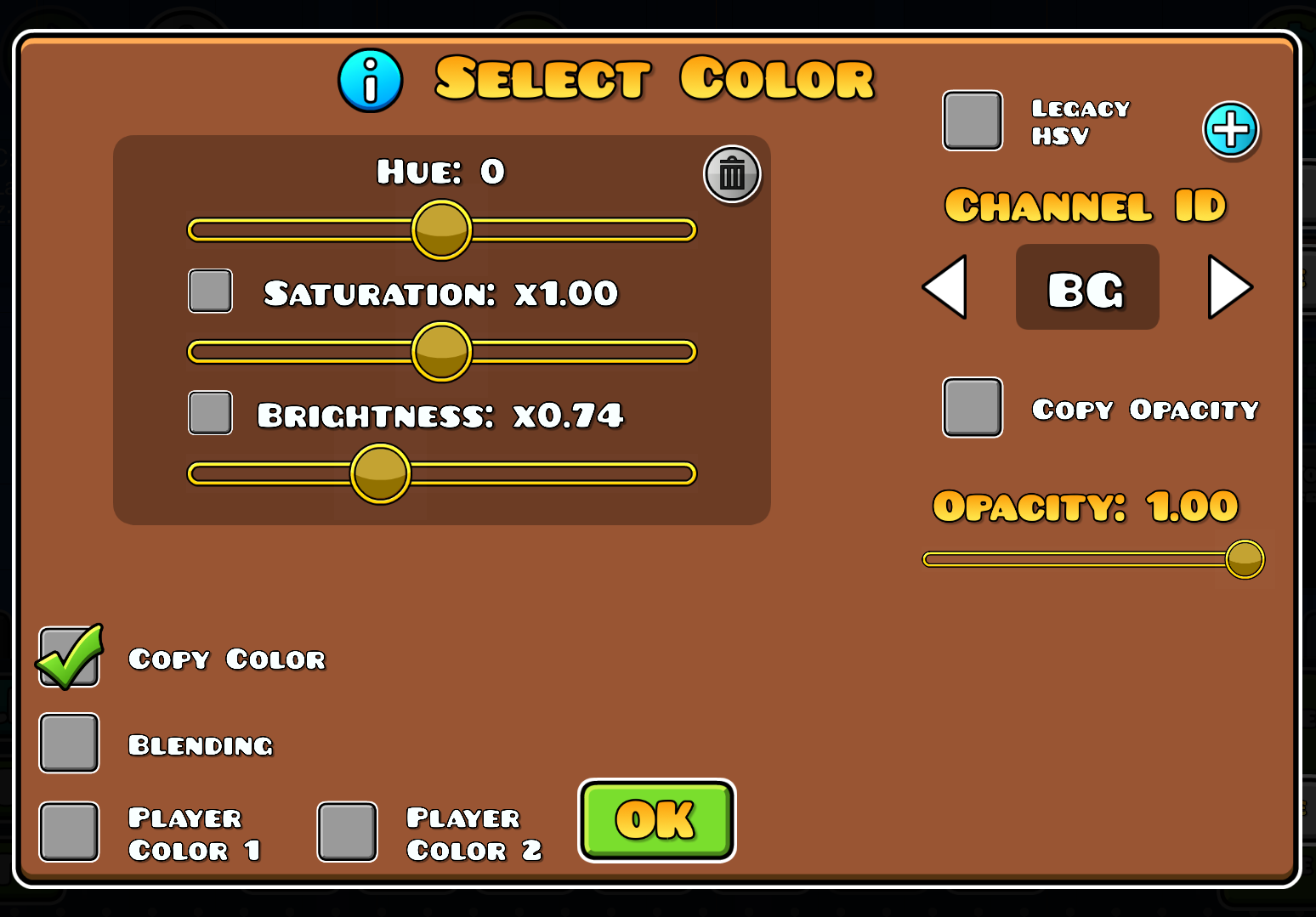 |
| Configure channel with Copy Color checked and Brightness between 0.50 and 0.80. |
Additional Disclaimers
- Anti-Circumvention: Any attempt to circumvent these standards, in ways that misuse allowed objects, will be banned as well.
- Final Decision: Any subjective criteria (such as determining whether black blocks are overused) will be judged by the Reliables and Feedbackers, and their decision is final.
- Resubmission Limit: If your level gets rejected over noncompliance with the above listed standards, you can fix the mistakes in the level and resubmit. If you make 3 resubmissions that ignore most issues, your level can be banned from resubmission.